
Americas


Europe, Middle East & Africa
 België (Nederlands)
Belgique (français)
België (Nederlands)
Belgique (français)
 Česká republika
 Danmark
 Deutschland
 España
 France
 Italia
 Magyarország
 Nederland
 Norge
Norge
 Polska
 Portugal
 România
 Schweiz (Deutsch)
 Slovensko (česky)
 South Africa
Suisse (français)
South Africa
Suisse (français)
 Suomi
Suomi
 Sverige
 Türkiye
 United Arab Emirates


Управление исправлениями
Сэкономьте время и деньги, упростив и автоматизировав процесс установки исправлений. Получите помощь в установке исправлений для ОС Windows и сотен популярных сторонних программ.

Включено в Ultimate Business Security
 30-дневная гарантия возврата денег

Использование неисправленных уязвимостей в программном обеспечении остается для хакеров одним из наиболее распространенных способов проникновения в систему.

Миф 1
Исправления для программного обеспечения можно игнорировать. Для защиты бизнеса от кибератак достаточно антивируса.
Факт
57 % случаев несанкционированного доступа к данным связаны с ненадлежащим управлением исправлениями.
Миф 2
Беспокоиться стоит только об исправлениях, выпускаемых Microsoft.
Факт
86 % уязвимостей обнаруживается в сторонних приложениях.
Миф 3
Если сеть будет скомпрометирована, можно будет исправить проблему позже.
Факт
У хакеров уходит 30 дней на использование уязвимости, а компании может потребоваться до 186 дней на исправление и до 500 000 долларов США, чтобы возместить ущерб от всего лишь одного нарушения кибербезопасности.
Миф 4
Большинство кибератак невозможно предотвратить.
Факт
Порядка 85 % целенаправленных атак можно предотвратить. На 10 самых известных уязвимостей приходится 85 % успешных проникновений.
Миф 5
Исправления нарушают работу программ и не работают должным образом.
Факт
Наши инженеры тратят бесчисленные часы на тщательное тестирование всех исправлений, прежде чем выпустить их. Это позволяет убедиться, что исправления работают как надо и не создают новых проблем.
Почему стоит выбрать службу «Управление исправлениями» Avast Business?
Это проверенная, лучшая в отрасли служба для управления исправлениями, позволяющая поддерживать актуальное состояние всех систем Windows и сторонних приложений с помощью последних исправлений.

Экономия времени благодаря автоматизации
Развертывайте тщательно проверенные исправления на тысячах машин за считанные минуты при минимальном воздействии на сеть.

Исправления для сторонних приложений
Поддержка исправлений для Microsoft Windows и ПО от сотен популярных поставщиков, включая iTunes®, Oracle® Java, Adobe® Flash® и Reader.

Удаленное развертывание исправлений
Устанавливайте исправления на устройства в любых условиях — под защитой брандмауэра, в дороге, на удаленных объектах... Даже во сне.

Централизованное управление
Управляйте всеми обновлениями Microsoft Windows и сотен сторонних программ с единой онлайн-платформы.

Укрепление и устранение уязвимых мест
Обеспечьте совместимость, укрепите слабые участки защиты, устраняйте уязвимости и удаленно развертывайте обновления для Windows и другого программного обеспечения.
Простая в использовании платформа и полный контроль
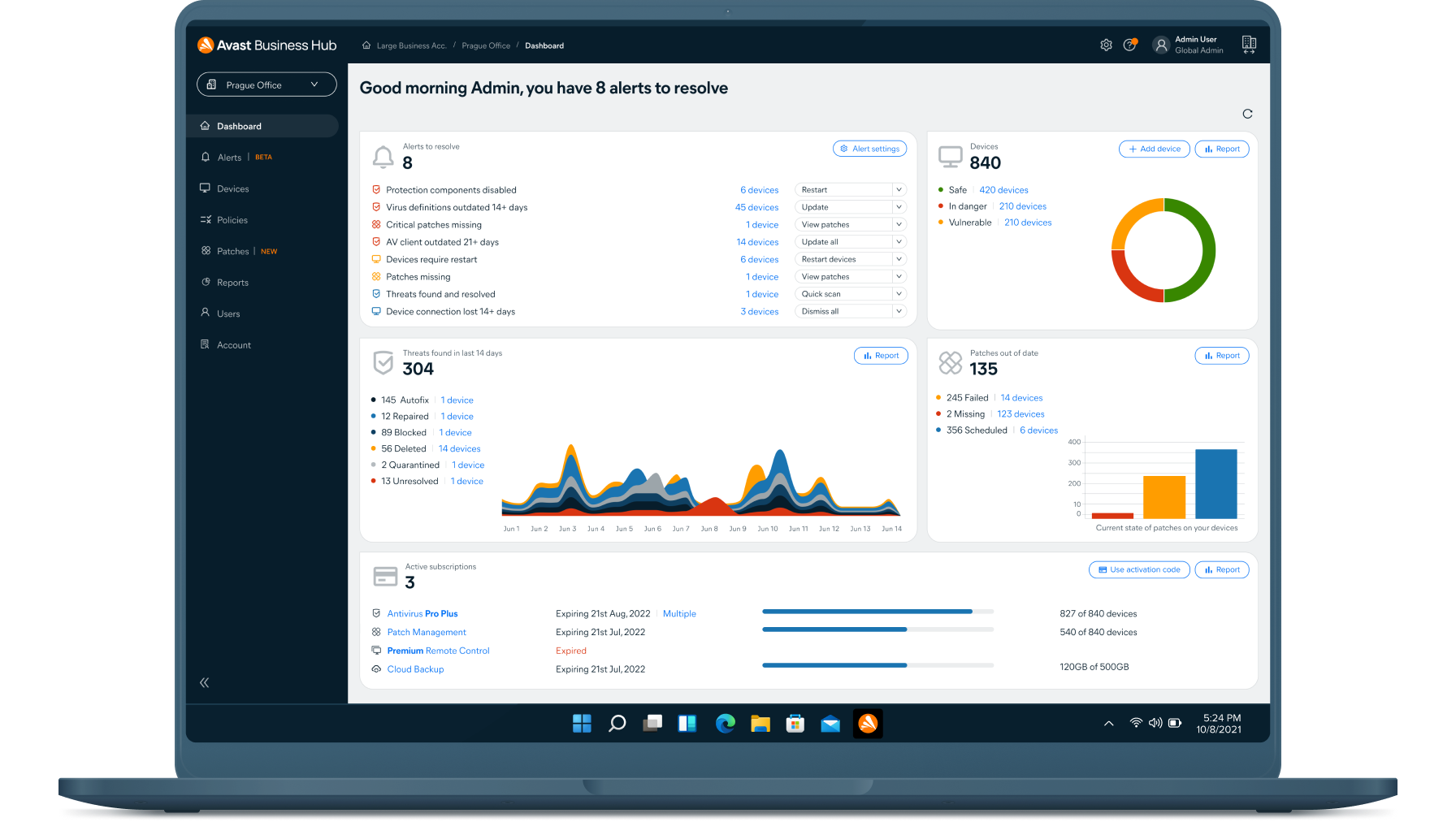
Наша онлайн-платформа для управления предоставляет бизнесу и ИТ-администраторам полный контроль над всем процессом установки исправлений, включая их обнаружение, распределение обновлений ПО и создание отчетов.
[
{
"sku": "PMG-00-001-12",
"locale": "ru-ru",
"instructions": "",
"useInstallments": "false",
"priceNote": "",
"pricePeriod": "в год",
"discountAsNumber": "0.0",
"discountLabelText": "Сэкономьте {price}",
"discountLabelStyle": "",
"basePriceNoteUndiscounted": "<b> {base-price} </b> за устройство в год",
"basePriceNote12": "первый год по цене <b>{base-price}</b> за устройство",
"basePriceNote24": "Первые 3 года по цене <b>{base-price}</b> за устройство",
"basePriceNote36": "Первые 3 года по цене <b>{base-price}</b> за устройство",
"billingText": "Экономия по сравнению с ценой продления {full_price}/год.",
"subscriptionText": "сведения о подписке",
"vatText": "Цена указана без НДС.",
"productJsonString": {"internalId":"PMG-00-001-12","productId":"4621063","currency":"RUB","currencySymbol":"₽","decimalSeparator":",","thousandSeparator":" ","priceFormat":"#p #c","precision":"0","link":"https://store-sl.avast.com/ru_RU/basket/add/?priceGroupId={PID}&auto_renew=1&quantity={QUANT}&auto&clear=Y","minQuantity":"1","maxQuantity":"999","vat":"1","prices":"{\"1\":\"1332.00\",\"5\":\"1289.00\",\"20\":\"1245.00\",\"50\":\"1135.00\",\"100\":\"1094.00\",\"250\":\"1054.00\",\"500\":\"1013.00\"}","futurePrices":"{\"1\":\"1332.00\",\"5\":\"1289.00\",\"20\":\"1245.00\",\"50\":\"1135.00\",\"100\":\"1094.00\",\"250\":\"1054.00\",\"500\":\"1013.00\"}","couponId":"","campaignCode":"","discount":"","maintenance":"12"}
},
{
"sku": "PMG-00-001-24",
"locale": "ru-ru",
"instructions": "",
"useInstallments": "false",
"priceNote": "",
"pricePeriod": "за 2 года",
"discountAsNumber": "0.0",
"discountLabelText": "Сэкономьте {price}",
"discountLabelStyle": "",
"basePriceNoteUndiscounted": "<b> {base-price} </b> за устройство в год",
"basePriceNote12": "первый год по цене <b>{base-price}</b> за устройство",
"basePriceNote24": "Первые 3 года по цене <b>{base-price}</b> за устройство",
"basePriceNote36": "Первые 3 года по цене <b>{base-price}</b> за устройство",
"billingText": "Экономия по сравнению с ценой продления {full_price}/год.",
"subscriptionText": "сведения о подписке",
"vatText": "Цена указана без НДС.",
"productJsonString": {"internalId":"PMG-00-001-24","productId":"4621064","currency":"RUB","currencySymbol":"₽","decimalSeparator":",","thousandSeparator":" ","priceFormat":"#p #c","precision":"0","link":"https://store-sl.avast.com/ru_RU/basket/add/?priceGroupId={PID}&auto_renew=1&quantity={QUANT}&auto&clear=Y","minQuantity":"1","maxQuantity":"999","vat":"1","prices":"{\"1\":\"2531.00\",\"5\":\"2450.00\",\"20\":\"2367.00\",\"50\":\"2156.00\",\"100\":\"2080.00\",\"250\":\"2003.00\",\"500\":\"1926.00\"}","futurePrices":"{\"1\":\"1332.00\",\"5\":\"1289.00\",\"20\":\"1245.00\",\"50\":\"1135.00\",\"100\":\"1094.00\",\"250\":\"1054.00\",\"500\":\"1013.00\"}","couponId":"","campaignCode":"","discount":"","maintenance":"24"}
},
{
"sku": "PMG-00-001-36",
"locale": "ru-ru",
"instructions": "",
"useInstallments": "false",
"priceNote": "",
"pricePeriod": "/3 года",
"discountAsNumber": "0.0",
"discountLabelText": "Сэкономьте {price}",
"discountLabelStyle": "",
"basePriceNoteUndiscounted": "<b> {base-price} </b> за устройство в год",
"basePriceNote12": "первый год по цене <b>{base-price}</b> за устройство",
"basePriceNote24": "Первые 3 года по цене <b>{base-price}</b> за устройство",
"basePriceNote36": "Первые 3 года по цене <b>{base-price}</b> за устройство",
"billingText": "Экономия по сравнению с ценой продления {full_price}/год.",
"subscriptionText": "сведения о подписке",
"vatText": "Цена указана без НДС.",
"productJsonString": {"internalId":"PMG-00-001-36","productId":"4621066","currency":"RUB","currencySymbol":"₽","decimalSeparator":",","thousandSeparator":" ","priceFormat":"#p #c","precision":"0","link":"https://store-sl.avast.com/ru_RU/basket/add/?priceGroupId={PID}&auto_renew=1&quantity={QUANT}&auto&clear=Y","minQuantity":"1","maxQuantity":"999","vat":"1","prices":"{\"1\":\"3597.00\",\"5\":\"3481.00\",\"20\":\"3366.00\",\"50\":\"3065.00\",\"100\":\"2956.00\",\"250\":\"2846.00\",\"500\":\"2736.00\"}","futurePrices":"{\"1\":\"1332.00\",\"5\":\"1289.00\",\"20\":\"1245.00\",\"50\":\"1135.00\",\"100\":\"1094.00\",\"250\":\"1054.00\",\"500\":\"1013.00\"}","couponId":"","campaignCode":"","discount":"","maintenance":"36"}
}
]
Avast Business Patch Management
Если вам требуется более {max} устройств, пожалуйста, свяжитесь с отделом продаж, чтобы получить оптимальное решение, адаптированное к вашим потребностям: свяжитесь с отделом продаж
текущая цена
1332.00
₽
в год
 30-дневная гарантия возврата денег
Как это работает
Служба «Управление исправлениями» ускоряет процесс обновления программного обеспечения, сокращая требуемое для этого время с нескольких месяцев до нескольких минут. Прежде чем отправить исправления вам, наша команда инженеров тщательно проверяет каждое из них для обеспечения надлежащей совместимости. Для тестирования мы применяем свой многолетний опыт в отрасли и инновации, позволяя вам быстро обновлять сторонние приложения и обеспечивать их защиту.

Сканирование всех устройств для поиска отсутствующих исправлений
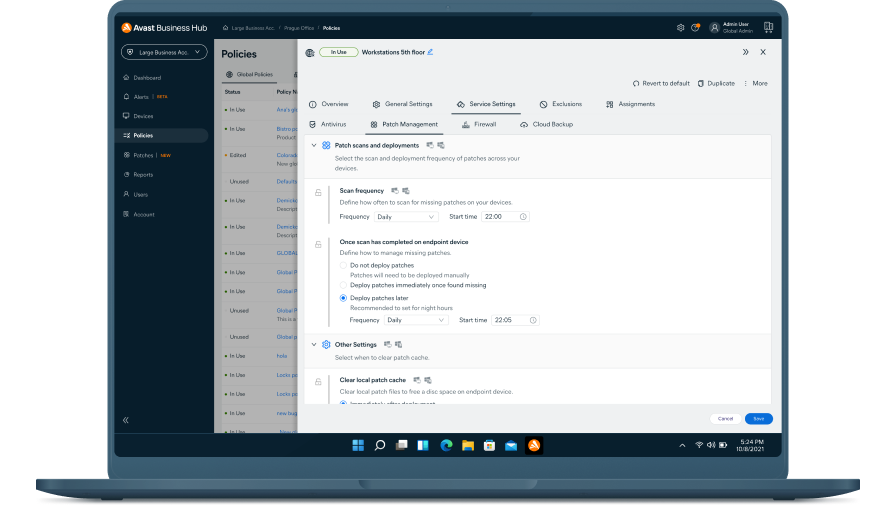
Выберите частоту сканирования на наличие исправлений (ежедневно, еженедельно или ежемесячно) и установите время его проведения.
Развертывание исправлений
Исправления автоматически устанавливаются для всех поставщиков, программ и степеней серьезности. Но при необходимости отдельные пункты можно без труда исключить.
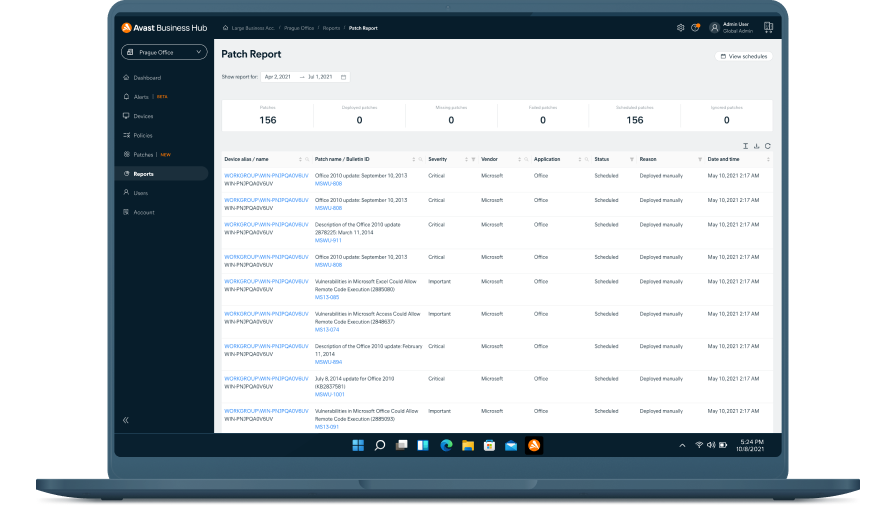
Просмотр состояния исправлений
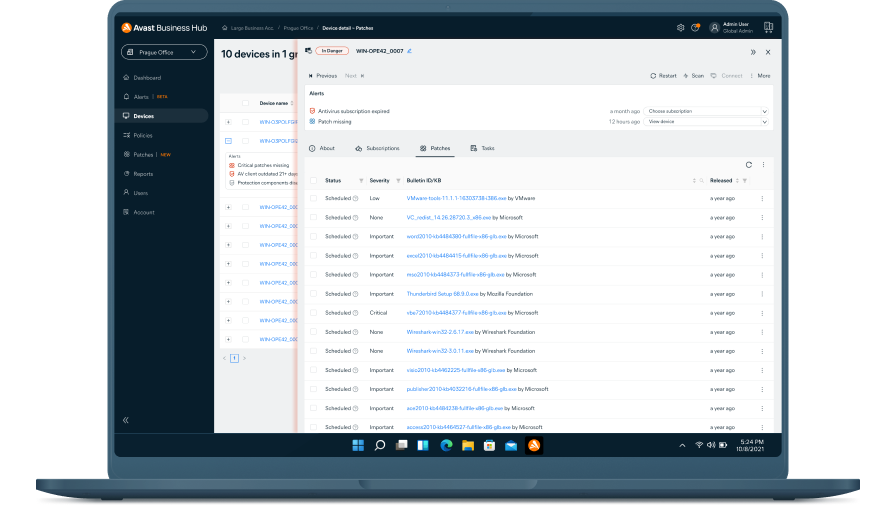
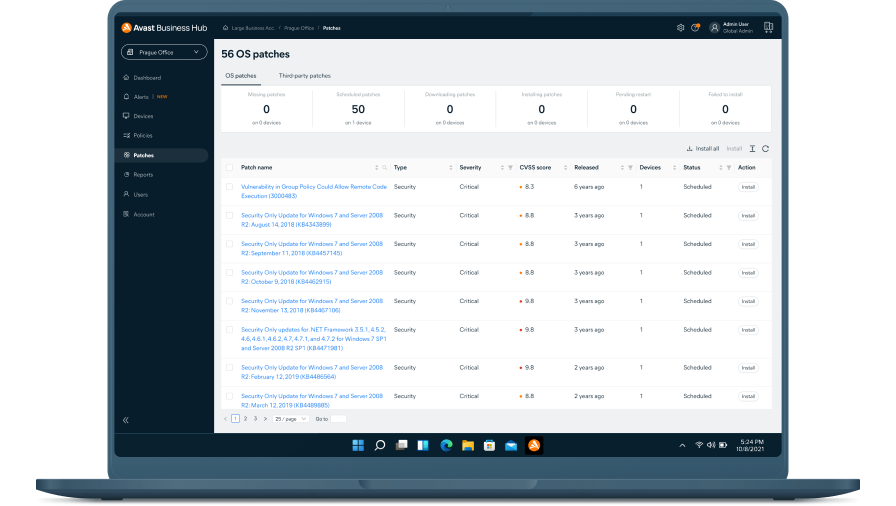
Панель управления позволяет увидеть недостающие исправления, их названия, уровень серьезности, сведения о выпуске, даты выхода и прочую информацию.
Экономия
Получите функцию «Управление исправлениями» в составе Ultimate Business Security
Нужна функция «Управление исправлениями»? Она входит в состав Ultimate Business Security — нашей защиты высочайшего уровня! Этот пакет сочетает в себе наш отмеченный наградами антивирус, защиту данных и средства обеспечения конфиденциальности, позволяющие защитить устройства и приложения, а также своевременно устанавливать обновления.

Следите за новыми угрозами для безопасности и способами их исправления

Гибкие графики развертывания
Планируйте установку утвержденных исправлений в нужное время или вручную устанавливайте их на отдельные устройства или группы устройств.

Возможности главного агента
Скачивайте все отсутствующие исправления на устройство, назначенное основным агентом, с которого их легко можно установить на все управляемые устройства в сети.

Интуитивно понятная панель управления
Управляйте всеми исправлениями для ПО и просматривайте наглядные сводки об установленных, отсутствующих и неудавшихся исправлениях на любом устройстве.

Настраиваемые исправления
Выбирайте поставщиков ПО, продукты и уровень серьезности исправлений для сканирования и установки. Без труда добавляйте программы в список исключений.

Автоматическое сканирование
Запланируйте автоматический запуск сканирования на наличие исправлений каждые 24 часа с развертыванием исправлений в выбранный день. Эти настройки по умолчанию можно изменить в любое время.
Тысячи исправлений
Устанавливайте исправления для ОС Windows и сотен сторонних программ, чтобы обеспечить всестороннюю защиту.

Откат изменений
Без труда откатывайте нестабильные исправления с отдельных устройств или игнорируйте их, чтобы они не отображались в результатах проверки и не устанавливались повторно.

Всесторонняя отчетность
Моментально определяйте состояние и уровень защищенности ПО на устройстве с помощью различных настраиваемых отчетов.
Получите функцию «Управление исправлениями» в Business Hub
Развертывание службы «Управление исправлениями» и других решений Avast происходит при помощи Business Hub, что обеспечивает удобство управления безопасностью конечных точек с единой платформы.
[
{
"sku": "PMG-00-001-12",
"locale": "ru-ru",
"instructions": "",
"useInstallments": "false",
"priceNote": "",
"pricePeriod": "в год",
"discountAsNumber": "0.0",
"discountLabelText": "Сэкономьте {price}",
"discountLabelStyle": "",
"basePriceNoteUndiscounted": "<b> {base-price} </b> за устройство в год",
"basePriceNote12": "первый год по цене <b>{base-price}</b> за устройство",
"basePriceNote24": "Первые 3 года по цене <b>{base-price}</b> за устройство",
"basePriceNote36": "Первые 3 года по цене <b>{base-price}</b> за устройство",
"billingText": "Экономия по сравнению с ценой продления {full_price}/год.",
"subscriptionText": "сведения о подписке",
"vatText": "Цена указана без НДС.",
"productJsonString": {"internalId":"PMG-00-001-12","productId":"4621063","currency":"RUB","currencySymbol":"₽","decimalSeparator":",","thousandSeparator":" ","priceFormat":"#p #c","precision":"0","link":"https://store-sl.avast.com/ru_RU/basket/add/?priceGroupId={PID}&auto_renew=1&quantity={QUANT}&auto&clear=Y","minQuantity":"1","maxQuantity":"999","vat":"1","prices":"{\"1\":\"1332.00\",\"5\":\"1289.00\",\"20\":\"1245.00\",\"50\":\"1135.00\",\"100\":\"1094.00\",\"250\":\"1054.00\",\"500\":\"1013.00\"}","futurePrices":"{\"1\":\"1332.00\",\"5\":\"1289.00\",\"20\":\"1245.00\",\"50\":\"1135.00\",\"100\":\"1094.00\",\"250\":\"1054.00\",\"500\":\"1013.00\"}","couponId":"","campaignCode":"","discount":"","maintenance":"12"}
},
{
"sku": "PMG-00-001-24",
"locale": "ru-ru",
"instructions": "",
"useInstallments": "false",
"priceNote": "",
"pricePeriod": "за 2 года",
"discountAsNumber": "0.0",
"discountLabelText": "Сэкономьте {price}",
"discountLabelStyle": "",
"basePriceNoteUndiscounted": "<b> {base-price} </b> за устройство в год",
"basePriceNote12": "первый год по цене <b>{base-price}</b> за устройство",
"basePriceNote24": "Первые 3 года по цене <b>{base-price}</b> за устройство",
"basePriceNote36": "Первые 3 года по цене <b>{base-price}</b> за устройство",
"billingText": "Экономия по сравнению с ценой продления {full_price}/год.",
"subscriptionText": "сведения о подписке",
"vatText": "Цена указана без НДС.",
"productJsonString": {"internalId":"PMG-00-001-24","productId":"4621064","currency":"RUB","currencySymbol":"₽","decimalSeparator":",","thousandSeparator":" ","priceFormat":"#p #c","precision":"0","link":"https://store-sl.avast.com/ru_RU/basket/add/?priceGroupId={PID}&auto_renew=1&quantity={QUANT}&auto&clear=Y","minQuantity":"1","maxQuantity":"999","vat":"1","prices":"{\"1\":\"2531.00\",\"5\":\"2450.00\",\"20\":\"2367.00\",\"50\":\"2156.00\",\"100\":\"2080.00\",\"250\":\"2003.00\",\"500\":\"1926.00\"}","futurePrices":"{\"1\":\"1332.00\",\"5\":\"1289.00\",\"20\":\"1245.00\",\"50\":\"1135.00\",\"100\":\"1094.00\",\"250\":\"1054.00\",\"500\":\"1013.00\"}","couponId":"","campaignCode":"","discount":"","maintenance":"24"}
},
{
"sku": "PMG-00-001-36",
"locale": "ru-ru",
"instructions": "",
"useInstallments": "false",
"priceNote": "",
"pricePeriod": "/3 года",
"discountAsNumber": "0.0",
"discountLabelText": "Сэкономьте {price}",
"discountLabelStyle": "",
"basePriceNoteUndiscounted": "<b> {base-price} </b> за устройство в год",
"basePriceNote12": "первый год по цене <b>{base-price}</b> за устройство",
"basePriceNote24": "Первые 3 года по цене <b>{base-price}</b> за устройство",
"basePriceNote36": "Первые 3 года по цене <b>{base-price}</b> за устройство",
"billingText": "Экономия по сравнению с ценой продления {full_price}/год.",
"subscriptionText": "сведения о подписке",
"vatText": "Цена указана без НДС.",
"productJsonString": {"internalId":"PMG-00-001-36","productId":"4621066","currency":"RUB","currencySymbol":"₽","decimalSeparator":",","thousandSeparator":" ","priceFormat":"#p #c","precision":"0","link":"https://store-sl.avast.com/ru_RU/basket/add/?priceGroupId={PID}&auto_renew=1&quantity={QUANT}&auto&clear=Y","minQuantity":"1","maxQuantity":"999","vat":"1","prices":"{\"1\":\"3597.00\",\"5\":\"3481.00\",\"20\":\"3366.00\",\"50\":\"3065.00\",\"100\":\"2956.00\",\"250\":\"2846.00\",\"500\":\"2736.00\"}","futurePrices":"{\"1\":\"1332.00\",\"5\":\"1289.00\",\"20\":\"1245.00\",\"50\":\"1135.00\",\"100\":\"1094.00\",\"250\":\"1054.00\",\"500\":\"1013.00\"}","couponId":"","campaignCode":"","discount":"","maintenance":"36"}
}
]
Avast Business Patch Management
Если вам требуется более {max} устройств, пожалуйста, свяжитесь с отделом продаж, чтобы получить оптимальное решение, адаптированное к вашим потребностям: свяжитесь с отделом продаж
текущая цена
1332.00
₽
в год
30-дневная гарантия возврата денег
Современная ИТ-безопасность
Ознакомьтесь с 10 поводами для использования более современной киберзащиты и 10 способами это сделать.

Повысить уровень защиты
Наше решение Ultimate Business Security создано для защиты от утечек и программ-вымогателей всех рабочих устройств, данных и приложений. Это удобное решение включает антивирус для бизнеса, средство для защиты конфиденциальности, инструмент для автоматической установки исправлений и многое другое.
Все, что нужно знать для эффективного использования службы «Управление исправлениями»
Ответы на другие часто задаваемые вопросы можно найти на странице нашего центра поддержки.

Сотни исправлений для сторонних программ у вас под рукой
[
{
"sku": "PMG-00-001-12",
"locale": "ru-ru",
"instructions": "",
"useInstallments": "false",
"priceNote": "",
"pricePeriod": "в год",
"discountAsNumber": "0.0",
"discountLabelText": "Сэкономьте {price}",
"discountLabelStyle": "",
"basePriceNoteUndiscounted": "<b> {base-price} </b> за устройство в год",
"basePriceNote12": "первый год по цене <b>{base-price}</b> за устройство",
"basePriceNote24": "Первые 3 года по цене <b>{base-price}</b> за устройство",
"basePriceNote36": "Первые 3 года по цене <b>{base-price}</b> за устройство",
"billingText": "Экономия по сравнению с ценой продления {full_price}/год.",
"subscriptionText": "сведения о подписке",
"vatText": "Цена указана без НДС.",
"productJsonString": {"internalId":"PMG-00-001-12","productId":"4621063","currency":"RUB","currencySymbol":"₽","decimalSeparator":",","thousandSeparator":" ","priceFormat":"#p #c","precision":"0","link":"https://store-sl.avast.com/ru_RU/basket/add/?priceGroupId={PID}&auto_renew=1&quantity={QUANT}&auto&clear=Y","minQuantity":"1","maxQuantity":"999","vat":"1","prices":"{\"1\":\"1332.00\",\"5\":\"1289.00\",\"20\":\"1245.00\",\"50\":\"1135.00\",\"100\":\"1094.00\",\"250\":\"1054.00\",\"500\":\"1013.00\"}","futurePrices":"{\"1\":\"1332.00\",\"5\":\"1289.00\",\"20\":\"1245.00\",\"50\":\"1135.00\",\"100\":\"1094.00\",\"250\":\"1054.00\",\"500\":\"1013.00\"}","couponId":"","campaignCode":"","discount":"","maintenance":"12"}
},
{
"sku": "PMG-00-001-24",
"locale": "ru-ru",
"instructions": "",
"useInstallments": "false",
"priceNote": "",
"pricePeriod": "за 2 года",
"discountAsNumber": "0.0",
"discountLabelText": "Сэкономьте {price}",
"discountLabelStyle": "",
"basePriceNoteUndiscounted": "<b> {base-price} </b> за устройство в год",
"basePriceNote12": "первый год по цене <b>{base-price}</b> за устройство",
"basePriceNote24": "Первые 3 года по цене <b>{base-price}</b> за устройство",
"basePriceNote36": "Первые 3 года по цене <b>{base-price}</b> за устройство",
"billingText": "Экономия по сравнению с ценой продления {full_price}/год.",
"subscriptionText": "сведения о подписке",
"vatText": "Цена указана без НДС.",
"productJsonString": {"internalId":"PMG-00-001-24","productId":"4621064","currency":"RUB","currencySymbol":"₽","decimalSeparator":",","thousandSeparator":" ","priceFormat":"#p #c","precision":"0","link":"https://store-sl.avast.com/ru_RU/basket/add/?priceGroupId={PID}&auto_renew=1&quantity={QUANT}&auto&clear=Y","minQuantity":"1","maxQuantity":"999","vat":"1","prices":"{\"1\":\"2531.00\",\"5\":\"2450.00\",\"20\":\"2367.00\",\"50\":\"2156.00\",\"100\":\"2080.00\",\"250\":\"2003.00\",\"500\":\"1926.00\"}","futurePrices":"{\"1\":\"1332.00\",\"5\":\"1289.00\",\"20\":\"1245.00\",\"50\":\"1135.00\",\"100\":\"1094.00\",\"250\":\"1054.00\",\"500\":\"1013.00\"}","couponId":"","campaignCode":"","discount":"","maintenance":"24"}
},
{
"sku": "PMG-00-001-36",
"locale": "ru-ru",
"instructions": "",
"useInstallments": "false",
"priceNote": "",
"pricePeriod": "/3 года",
"discountAsNumber": "0.0",
"discountLabelText": "Сэкономьте {price}",
"discountLabelStyle": "",
"basePriceNoteUndiscounted": "<b> {base-price} </b> за устройство в год",
"basePriceNote12": "первый год по цене <b>{base-price}</b> за устройство",
"basePriceNote24": "Первые 3 года по цене <b>{base-price}</b> за устройство",
"basePriceNote36": "Первые 3 года по цене <b>{base-price}</b> за устройство",
"billingText": "Экономия по сравнению с ценой продления {full_price}/год.",
"subscriptionText": "сведения о подписке",
"vatText": "Цена указана без НДС.",
"productJsonString": {"internalId":"PMG-00-001-36","productId":"4621066","currency":"RUB","currencySymbol":"₽","decimalSeparator":",","thousandSeparator":" ","priceFormat":"#p #c","precision":"0","link":"https://store-sl.avast.com/ru_RU/basket/add/?priceGroupId={PID}&auto_renew=1&quantity={QUANT}&auto&clear=Y","minQuantity":"1","maxQuantity":"999","vat":"1","prices":"{\"1\":\"3597.00\",\"5\":\"3481.00\",\"20\":\"3366.00\",\"50\":\"3065.00\",\"100\":\"2956.00\",\"250\":\"2846.00\",\"500\":\"2736.00\"}","futurePrices":"{\"1\":\"1332.00\",\"5\":\"1289.00\",\"20\":\"1245.00\",\"50\":\"1135.00\",\"100\":\"1094.00\",\"250\":\"1054.00\",\"500\":\"1013.00\"}","couponId":"","campaignCode":"","discount":"","maintenance":"36"}
}
]
Avast Business Patch Management
Если вам требуется более {max} устройств, пожалуйста, свяжитесь с отделом продаж, чтобы получить оптимальное решение, адаптированное к вашим потребностям: свяжитесь с отделом продаж
текущая цена
1332.00
₽
в год
30-дневная гарантия возврата денег
Готовы начать?
Купите в Интернете
Приобретайте решения Avast Business прямо на сайте и обеспечьте свои конечные точки надежной защитой уже сегодня.
Свяжитесь с нами
Поговорите с экспертом по продуктам Avast для бизнеса. Каким бы ни был ваш бизнес, у нас есть решение для вас.
Важная информация о вашей подписке
Что такое подписка
Подписка — это обязательство Avast перед вами как нашим клиентом, которое предполагает оказание услуг по защите и оптимизации устройств, а также обеспечению защищенного виртуального соединения в обмен на ежегодную плату, которую мы взимаем с вашей банковской карты или учетной записи PayPal. Оплачивая подписку, вы позволяете Avast предоставлять выбранную вами услугу, на которую вы подписаны, вплоть до того момента, пока вы не отмените подписку. Если срок действия вашей подписки истек, вы можете обратиться к нам за помощью здесь.
Выбранный период, который вы оплачиваете, измеряется в месяцах и может составлять один месяц, один год или несколько лет в зависимости от выбранной услуги, на которую вы оформили подписку Avast. В конце выбранного вами периода, который вы оплатили, Avast будет автоматически взимать плату, используя сохраненные платежные реквизиты, что обеспечит непрерывность предоставления услуг.
Условия автоматического продления и ценообразования
Плата за следующий период подписки будет соответствовать опубликованной на тот момент цене. Мы будем взимать плату, используя сохраненные платежные реквизиты, не более чем за 35 дней до истечения срока действия подписки на Avast. Цены могут изменяться. Если у вас есть подписка на год, мы уведомим вас об истечении срока ее действия за 65 дней. Мы также напомним, какая плата будет взиматься за продление подписки на следующий период.
Avast продает свои продукты по принципу непрерывности подписки, согласно которому на протяжении срока действия вашей подписки и использования нашего ПО мы будем оказывать вам постоянную поддержку. Это означает, что срок действия вашей подписки не будет прерываться до тех пор, пока вы не отмените ее самостоятельно перед датой взимания платы или пока своевременное взимание платы с помощью сохраненных платежных реквизитов не окажется невозможным. Мы используем этот принцип непрерывности подписки, чтобы обеспечить постоянную доступность наших услуг и вашу возможность использовать их преимущества.
Avast предлагает множество различных услуг, на которые вы можете оформить годовую подписку. Кроме того, мы часто предлагаем скидки на первый год использования этих подписок, чтобы вам было проще присоединиться к нашему сообществу и получить доступ к нашим лучшим из существующих на рынке услугам. Это означает, что первый период подписки (в отличие от последующих) может оплачиваться со скидкой. При первом оформлении подписки на наши услуги мы всегда ясно показываем эту разницу в цене. Прежде чем срок действия подписки истечет, мы отправим вам напоминание о сумме оплаты следующего периода.
Возврат средств, обновления и отмена подписок
Avast взимает плату за предоставляемые услуги, используя только сохраненный способ оплаты. Других способов получить оплату нет. Это означает, что вы должны выразить согласие на сохранение вашего способа оплаты при первой покупке и по необходимости обновлять платежные данные, чтобы обеспечить непрерывное предоставление услуг в течение срока действия подписки и взаимодействия с нами. Подписку можно отменить с помощью учетной записи Avast, которая связана с адресом электронной почты, указанным при покупке подписки. Дополнительную информацию и инструкции по отмене подписки можно найти здесь.
Вы можете запросить возврат средств в течение 30 дней с момента оформления первой подписки или ее продления, обратившись в службу поддержки Avast здесь. Общую информацию о подписках и их продлении можно найти здесь.
Обязательства клиента
Мы крайне серьезно относимся к возложенным на нас обязательствам, но также надеемся, что и вы будете выполнять свои, а именно: регистрироваться для использования наших продуктов, скачивать, устанавливать и регулярно обновлять наше ПО. Это важно, поскольку мы стремимся постоянно совершенствовать услуги, на которые вы подписались, и расширять их возможности. Мы хотим, чтобы наши усилия приносили вам пользу. Непрерывное усовершенствование наших услуг и расширение их возможностей регулируются Лицензионным соглашением с конечным пользователем Avast, с которым можно ознакомиться здесь.

Avast recommends using the FREE Chrome™ internet browser.